Translate

Friday, 30 January 2015

IPhone

iPhone 5c for free

Apple is a leading company in digital era which launches innovative products in its every launch.
It has wide range of products. iPhone has exclusively different models compared to remaining mobile manufacturing competitors. At present available models of iPhone directly from the Apple online store(USA) are iPhone6 plus, iPhone6, iPhone 5s and iPhone 5c.
        The attraction for the iPhone models are the security with the finger prints (Touch-Id). Each model has its unique specification, you can refer at www.apple.com

Good News to the residents of USA, you can get a brand new iPhone 5c absolutely for free.
Here is the process to get the brand new iPhone 5c for free.
  1. Visit www.apple.com
  2. Click on iPhone option on the top of the website.
  3. Open "Compare iPhone models"
  4. Scroll down, you will find buy now option under iPhone 5c.
  5. Click buy now.
  6. Now click on iPhone 5c on top of the website, you will be redirected to the online apple store.
  7. Choose your desired color.
  8. Select your carrier,                                                                                                                             Note: 2-year contract1 or carrier financing.  (It is a contract basis)
  9.  Click "Select" on right side under your selected product.
  10. Login or Register new account and proceed further.
You can also get unlocked and contract free model with T-Mobile SIM or SIM free but you have to own it by paying amount.


Enjoy the brand new iPhone.....

Monday, 16 June 2014

List of commands for Windows 7

Even works for windows8

Here are some list of commands useful for windows environment.
All these commands should be entered in Run box.
Click start--> type Run
                 (or)
 Windows key+R

Command
Function of command
Documents
Opens Documents Folder
Downloads
Opens Downloads Folder
favorites
Opens Favorites Folder
Recent
Opens Recent Folder
Pictures
Opens Pictures Folder
calc
Calculator
charmap
Character Map
cmd
Command Prompt
displayswitch
Connect to a Projector
control
Control Panel
timedate.cpl
Date and Time
locationnotifications
Default Location
devmgmt.msc
Device Manager
hdwwiz.cpl
Device Manager
dxdiag
DirectX Diagnostic Tool
cleanmgr
Disk Cleanup
dfrgui
Disk Defragmenter
diskmgmt.msc
Disk Management
iexplore
Internet Explorer
inetcpl.cpl
Internet Options
magnify
Magnifier
narrator
Narrator
ncpa.cpl
Network Connections
notepad
Notepad
osk
On-Screen Keyboard
mspaint
Paint
tabletpc.cpl
Pen and Touch
telephon.cpl
Phone and Modem
dialer
Phone Dialer
desk.cpl
Screen Resolution
mmsys.cpl
Sound
soundrecorder
Sound recorder
stikynot
Sticky Notes
credwiz
Stored User Names and Passwords
taskmgr
Task Manager
taskschd.msc
Task Scheduler
useraccountcontrolsettings
User Account Control Settings
utilman
Utility Manager
wscui.cpl
Windows Action Center
firewall.cpl
Windows Firewall
wf.msc
Windows Firewall with Advanced Security
journal
Windows Journal
wmplayer
Windows Media Player
wuapp
Windows Update
write
WordPad
xpsrchvw
XPS Viewer


Save time, using shortcut commands......! 

Sunday, 15 June 2014

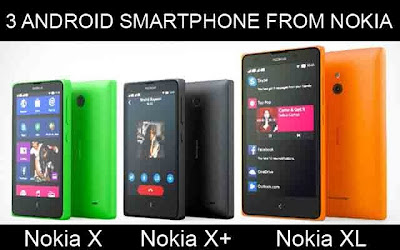
Root Nokia X, X+, XL


The wonderful mobile models launched by Microsoft in average budget is Nokia X, X+, XL
The specification of the mobiles are up to the high end.
Nokia Xl have most of the features that we need, some are listed below.

Supports both 2 G and 3 G 
Optional dual sim (micro sim)
IPS LCD capacitive touch screen, 16 M colors 
Micro SD up to 32 GB
Internal 4 GB
Ram 786 MB
Wifi, Wifi hotspot
5 MP cam with autofocus, LED flash light.
Front cam 2 MP
Video 480p@30fps
Os Android 4.1.2, Nokia X platform 1.0 UI
for more information click here

How ever it has many best features, but the problem is even though it supports Android apps, it do not have "Play store".
Read this article to install Play store in your device.
Nokia X, X+ and XL every device supports the same method for installing Play store.
For this you need to root your device.

Download "kingo android root" from here
Install in your pc
Connect your device to pc
Note: You need to connect your device in debugging mode
You will be shown to enable debugging mode in Kingo android root software.
Click root.
Your device is now rooted.
Disconnect it from pc, then download "play store.apk" file and install it in your device.
Connect your device again to pc and remove root.
Play store is ready in your device.
Now you can download apps from Play store.

Have fun with Play store in your device.....!